
WhatsApp automation for restaurants: bookings, waitlists and reviews
Which WhatsApp flows a restaurant should automate: reservation confirmations, reminders with cancel, waitlist alerts, menu questions and review requests, with 2026 costs and a worked example.
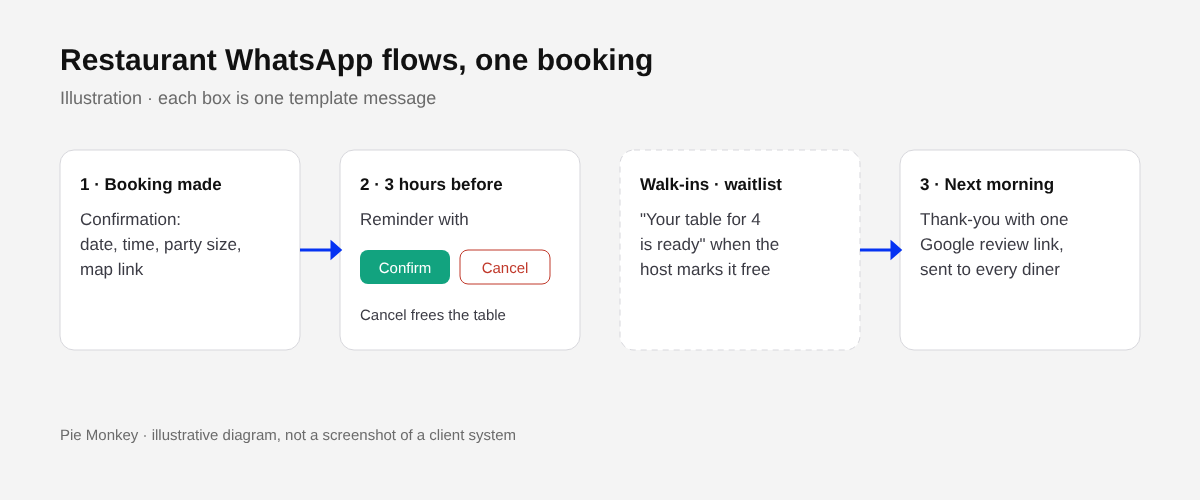
Automate the reservation confirmation and a same-day reminder with a Cancel button first, so empty tables get freed early. Then add waitlist alerts for walk-ins, answers to the questions diners always ask, and a review request the next morning. See how we build message automations.
Reviewed on 26 November 2026 against Meta's WhatsApp pricing and template documentation and Google's review policy.
Quick answer
Start with the messages that protect covers: confirm, remind, and let people cancel in one tap. The table shows five flows in the order we would build them.
| Flow | When it fires | What it saves |
|---|---|---|
| Reservation confirmation | When the booking is made | "Did my booking go through?" calls |
| Reminder with Cancel | 3 hours before (day before for big parties) | Empty tables from no-shows |
| Waitlist alert | When the host marks a table free | Walk-ins leaving while they wait |
| Menu and policy answers | Any time a diner writes | Calls about parking, veg options, corkage |
| Review request | The next morning | Forgotten follow-ups |
How restaurants use WhatsApp differently from hotels
A hotel guest stays for days and messages you throughout. A diner's whole journey is a few hours. So restaurant flows are shorter and more time-critical: the reminder and the waitlist alert must arrive at the right minute, or they are useless.
Restaurants also handle more bookings per day with smaller value each. Flows need to run without the host touching them. For the hotel version, see WhatsApp automation for hotels.
How we put this guide together
We based this on Meta's and Google's documentation, linked in each section, and on the guest-messaging flows we build for hospitality clients. We do not publish restaurant client results yet, so the numbers below are a labelled planning example.
Confirm every reservation straight away
The confirmation is the first message: date, time, party size, a map link and how to change the booking. It tells the diner the booking worked and opens a chat they can reply to.
Remind diners with a one-tap Cancel
Send the reminder about 3 hours before the booking, or the day before for large parties. Include Confirm and Cancel buttons. A diner who would have quietly not turned up will often tap Cancel, and that frees the table in time to give it to a walk-in.
Make sure a Cancel reply updates your booking system or the host's list automatically. Otherwise the freed table stays empty.
Text walk-ins when their table is ready
For walk-ins, take a WhatsApp number instead of handing out a buzzer. When the host marks a table free, the diner gets "Your table for 4 is ready" and can wait at the bar or nearby. The host stand stops shouting names.
Answer the questions diners always ask
Parking, vegetarian and vegan options, kids' menus, corkage, last orders, private dining. A WhatsApp assistant can answer these from a short document you write, and hand over to staff for anything else, such as allergies. Never let an automated reply guess about allergens; send those to a person every time.
Keep reminders as utility messages
Meta sorts templates into categories with different prices. Confirmations and reminders about a diner's own booking can be utility messages, which must be non-promotional, according to Meta's template categorization rules.
Know before you write: adding "Try our new dessert menu!" to a reminder turns it into a marketing message, which usually costs more. Keep promotions in separate messages, only for diners who opted in to them.
Ask for a review the next morning
Send a short thank-you with one link to your Google review form the morning after the meal. Ask every diner the same way and offer nothing in return. Google's content policy prohibits incentives for reviews and selectively asking only happy customers.
Reviews that mention dishes and occasions help you show up when people search "rooftop dinner in [area]" or ask an AI assistant where to eat. Our guide on hotel review requests covers timing and wording in more detail.
What WhatsApp costs a restaurant in 2026
Meta charges per delivered message, by category and the diner's country, according to its pricing page. Confirmations, reminders and review requests are usually utility templates. Since 1 October 2026, free-form replies are free only up to 1,000 a month per number, and utility replies inside an open chat are charged.
Check your country's rates on Meta's rate cards, and add your WhatsApp provider's fee.
Worked example: a 60-cover restaurant
This is a planning example, not a client result. Replace the assumptions with your own numbers.
- Bookings: 20 reservations a night × 30 nights = 600 a month.
- Messages: confirmation, reminder and review request = 3 × 600 = 1,800 utility messages a month.
- No-shows before: assume 8 in 100 bookings don't turn up = 48 empty tables.
- No-shows after: if one-tap Cancel brings that to 4 in 100, and you refill the freed tables = 24 tables saved.
- Value: at ₹2,000 average spend per table, 24 × ₹2,000 = ₹48,000 a month.
Track your no-show rate for a month before starting so you have a fair comparison.
Set up restaurant WhatsApp automation in six steps
- Pick where bookings live. Your reservation system, or a shared sheet the host uses.
- Get a WhatsApp Business Platform number. Use a provider or Meta's Cloud API, in the restaurant's name.
- Collect opt-in. Add a WhatsApp consent line to your booking form, as Meta's opt-in guide requires.
- Write and submit templates. A confirmation, a reminder with Confirm and Cancel, a table-ready alert and a review request.
- Connect triggers and write-back. Bookings send confirmations, the clock sends reminders, and Cancel frees the table.
- Test for a week with staff. Then switch on for real diners, one flow at a time.
FAQ
What should a restaurant automate on WhatsApp first?
The reservation confirmation and a same-day reminder with a Cancel button. Together they cut "did my booking work?" calls and free tables from diners who would not have turned up.
When should a restaurant send a booking reminder?
About 3 hours before for normal bookings, and the day before for large parties or special menus. That leaves enough time to refill a cancelled table.
Can I use the free WhatsApp Business app for restaurant bookings?
Only by hand. The free app cannot send confirmations or reminders automatically from your booking system. Automated flows need the WhatsApp Business Platform.
Is a reservation reminder a utility or marketing message?
It can be utility if it is only about the diner's booking. Adding a promotion makes it marketing under Meta's rules, which usually costs more.
Can a WhatsApp bot answer allergy questions?
It should not. Send every allergy question to a member of staff. An automated reply can answer parking, opening hours and menu basics, but allergen advice needs a person who knows today's kitchen.
Can I give diners a discount for a Google review?
No. Google's content policy prohibits discounts, free food or any reward in exchange for a review. Ask every diner the same way, with nothing attached.
Disclosure: Pie Monkey builds WhatsApp automation for hospitality businesses, so we have an interest in this topic. The worked example is a planning illustration, not client data. Spot a mistake? Email mannan@piemonkey.io.
Want this running at your restaurant? Tell us about your restaurant and we'll map your booking flow with you. Free first call · No card needed · Reply within one working day.