
Hotel review requests on WhatsApp: timing, wording and Google's rules
How to ask hotel guests for Google reviews on WhatsApp: send a few hours after checkout, one link, no rewards, ask everyone, with a message template and a worked example.
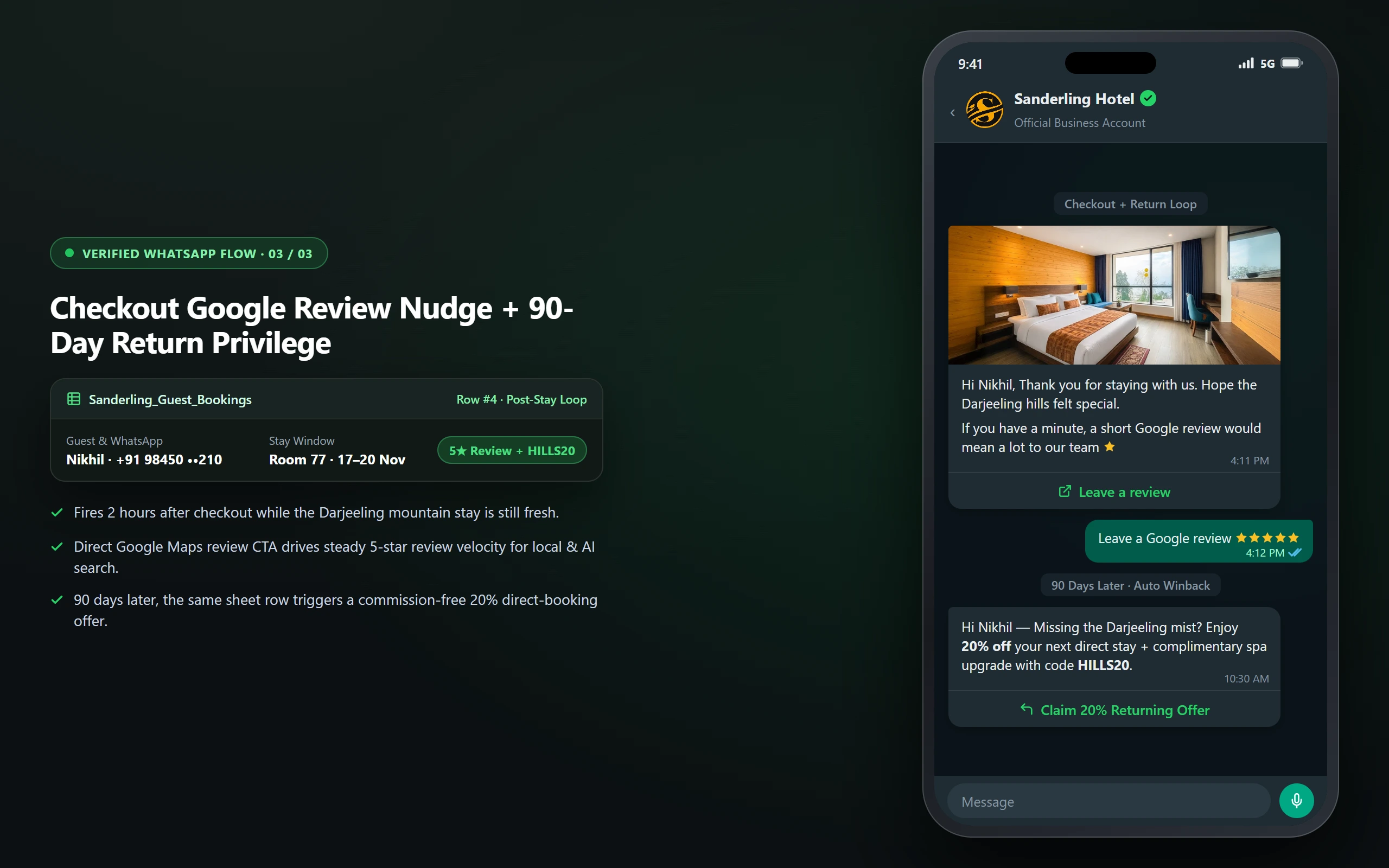
Send every guest one WhatsApp message a few hours after checkout, thanking them by name and linking straight to your Google review form. Ask everyone the same way, offer nothing in return and never send a second reminder. That keeps you inside Google's rules and brings in the fresh, detailed reviews that help you in Maps and AI Overviews. See how we build hotel WhatsApp flows.
Reviewed on 26 November 2026 against Google's review policy and Business Profile help, and Meta's WhatsApp template rules.
Quick answer
One message, one link, sent to every guest while the stay is still fresh. The table covers the decisions that matter.
| Decision | Do this | Avoid this |
|---|---|---|
| Timing | 2–4 hours after checkout, in daytime | During a complaint, late at night, or days later |
| Who gets it | Every guest who checked out | Only guests who seemed happy |
| Where to send them | Your Google review link | Five platforms in one message |
| Reward | None | Discounts, upgrades or free nights for a review |
| Follow-ups | None | "Just reminding you…" messages |
How we put this guide together
We based this on Google's and Meta's own documentation, linked throughout, and on the review flow we built for Sanderling Resort & Spa in Darjeeling. We have not run an A/B test of message wording across hotels, so the template below is a starting point to adjust.
Ask everyone the same way, because Google requires it
Google's Maps content policy says businesses may not "selectively solicit positive reviews from customers". That rules out review gating: sending happy guests to Google and unhappy guests to a private form.
The same policy prohibits incentives "such as payment, discounts, free goods and/or services" in exchange for a review. A 10% discount for a review breaks it, and Google can remove the reviews. What Google does allow is asking customers to share a genuine experience, with no reward and no attempt to influence the rating.
Send it a few hours after checkout
Timing does more than wording. A few hours after checkout, the guest is on the road or at the airport, the stay is fresh, and they have a minute. At Sanderling, the request goes out about two hours after checkout.
Do not send it while a complaint is open. Fix the problem in the chat first. If the guest is still unhappy, they may leave a negative review, and that is their right; reply to it calmly and publicly.
Use one link to your Google review form
Google's tips to get more reviews suggest sharing a direct link or QR code to your review form. Use that one link. A message that lists Google, TripAdvisor, Booking.com and Facebook gets fewer reviews on all of them.
Google is usually the best single choice, because Google reviews feed your Business Profile, Maps and Google's AI answers. Our Google Business Profile guide shows how reviews fit with the rest of your profile.
Word it like a thank-you, not a request form
Here is the structure we start from. Adapt the wording to your hotel's voice:
Hi {{first_name}}, thank you for staying with us at {{hotel_name}}. We hope {{place}} felt special. If you have a minute, a short Google review would mean a lot to our team. {{review_link}}
Know before you submit: keep this template free of offers. Under Meta's template categorization rules, a message about the guest's stay can be a utility template only if it is non-promotional. Adding "and get 20% off your next stay" makes it marketing, which usually costs more. At Sanderling, the return offer is a separate message sent 90 days later.
Reply to every review, good and bad
Google advises replies that are short, personal and "conversational, not promotional". Thank people by name and mention something specific from their review. For a negative review, apologise where it is fair, say what you changed, and offer a way to talk privately.
Future guests read your replies. A calm answer to a bad review often does more for bookings than another five-star review.
How reviews help your hotel in Google and AI answers
Fresh reviews that mention specific things, like "five minutes from Mall Road" or "great spa", match the words travellers search with. They also give Google's AI Overviews and ChatGPT concrete details to repeat when they describe your hotel. Read more in our guide to SEO for hotels.
Worked example: review volume for a 30-room hotel
This is a planning example, not a client result. Measure your own rates.
- Checkouts: 30 rooms × 70% occupancy × 30 nights ÷ 2-night average stay = 315 a month.
- Without asking: if 2 in 100 guests review unprompted = about 6 reviews a month.
- With one WhatsApp request: if 8 in 100 guests then leave a review = about 25 reviews a month.
- Over a year: 25 × 12 = 300 reviews, against about 72 without asking.
Each request is one template message, so 315 a month at your country's utility rate on Meta's pricing page.
Set up a WhatsApp review request in five steps
- Get your Google review link. Find it in your Business Profile, following Google's help page.
- Collect WhatsApp opt-in at booking. Meta requires it before you message guests; see its opt-in guide.
- Write and submit the template. A short thank-you with the review link and no offers.
- Trigger it from checkout. When a guest is checked out in your PMS or bookings sheet, send the message a few hours later, during the day.
- Reply to every review. Set aside a few minutes each day to answer new reviews.
FAQ
When is the best time to ask hotel guests for a review?
A few hours after checkout, during the day. The stay is fresh and the guest has a free moment. Avoid asking during an open complaint or several days later, when the memory has faded.
Can I offer a discount to guests who leave a Google review?
No. Google's content policy prohibits payment, discounts, free goods or services in exchange for reviews. Breaking it can lead to reviews being removed.
Can I ask only happy guests for reviews?
No. Google's policy prohibits selectively soliciting positive reviews. Send the same request to every guest who checks out, and handle complaints openly.
Should I ask for a Google review or a TripAdvisor review?
Pick one per message. Google is usually the best single choice, because its reviews feed your Business Profile, Maps and Google's AI answers. If TripAdvisor matters more in your market, use that instead.
Should I send a reminder if the guest doesn't leave a review?
No. One request is enough. Repeated reminders annoy guests, invite blocks of your WhatsApp number and can lower your quality rating with Meta.
Is a review request a utility or marketing message on WhatsApp?
It can be utility if it is only about the guest's stay and has no promotion. Adding an offer turns it into marketing under Meta's rules, which usually costs more. Keep return offers in a separate message.
Disclosure: Pie Monkey builds WhatsApp review and guest flows for hotels, so we have an interest in this topic. The Sanderling example is our own client work. Spot a mistake? Email mannan@piemonkey.io.
Want the review request running at your hotel? Tell us about your property and we'll set it up with your checkout process. Free first call · No card needed · Reply within one working day.